EGAPPBox is an APP made during internship in Engineering Good to assist Computers against Covid programme (Year 2020 -2021).
EGAPPBoxV2 is an updated version for EGAPPBox-CAC.
It has better looking and functionality than the previous version.
The App can now run in both MacOS and Windows( Minimum requirement: macOS 10.10 (Yosemite) & Windows 7).
It will auto detect the OS of the PC and alter the CAC form ( A form which store PC details ) and the format of storing data.
The data retrieve from the PC will now store online in MongoDB and can be retrieve from anywhere which allows users to easily access the data and print out as PDF.
This is created to help Tech Team in Computers against Covid Project by Engineering Good SG. The App will help Tech Team to auto detect computer information like model name and serial number of the PC and print out the result in a form (CAC Form) as a PDF.
The record saved by the tech team will also be uploaded and saved to Google Sheets so that the person-in-charge in Engineering Good can easily track the location of the laptops and their details.
ElectronJS App
EGAPPBox is built with ElectronJS.
Electron is an open-source software framework developed and maintained by GitHub.
It allows for the development of desktop GUI applications using web technologies: it combines the Chromium rendering engine and the Node.js runtime.
(Wikipedia for more info)
Programming Languages Used in the App:
HTML5
CSS
JavaScript
EGAPPBoxV2 Workflows
There are a few workflow on this will be carried out by Engineering Good Tech Team during PC QC.
What should the Sender do?
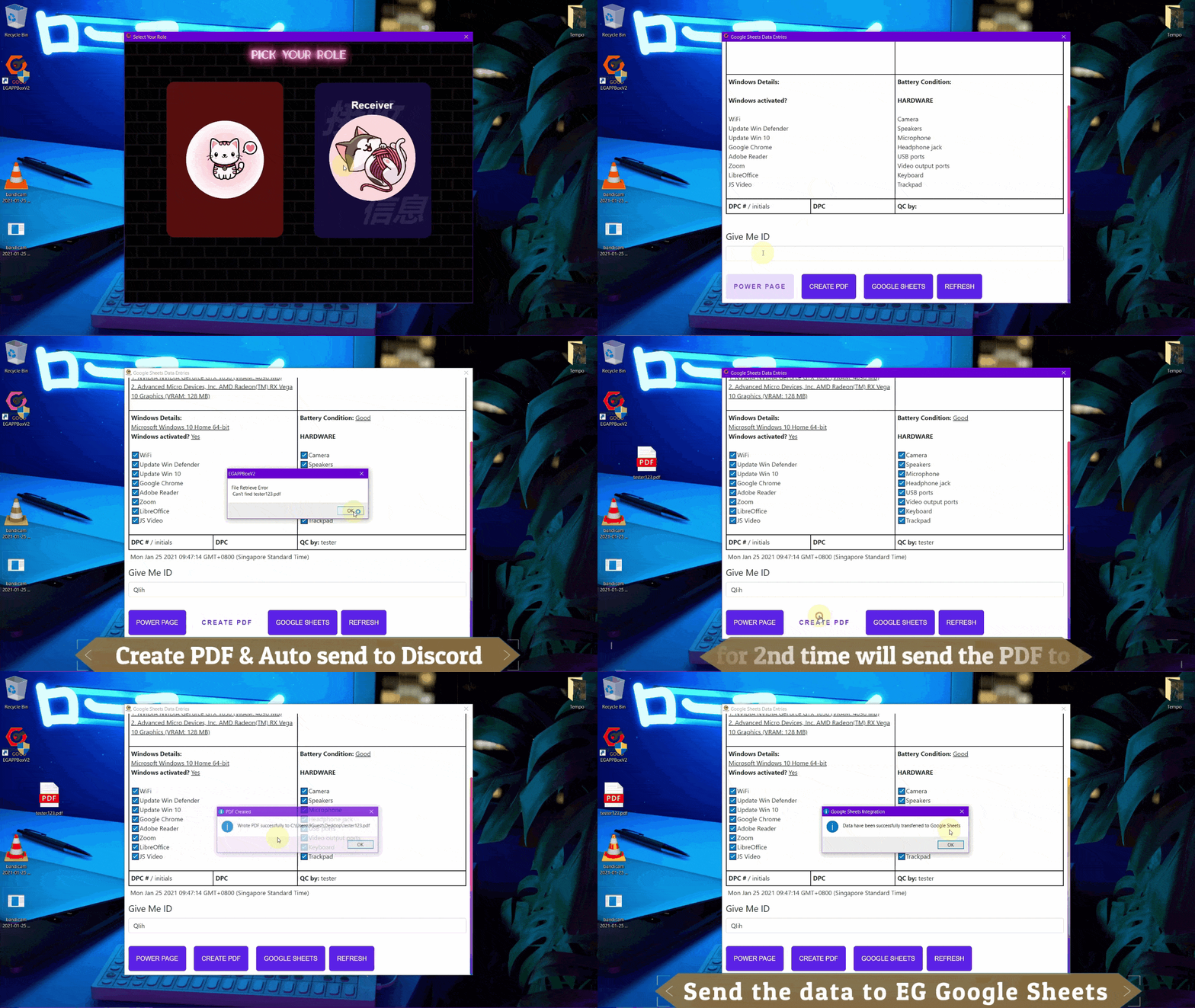
What should the Receiver do?
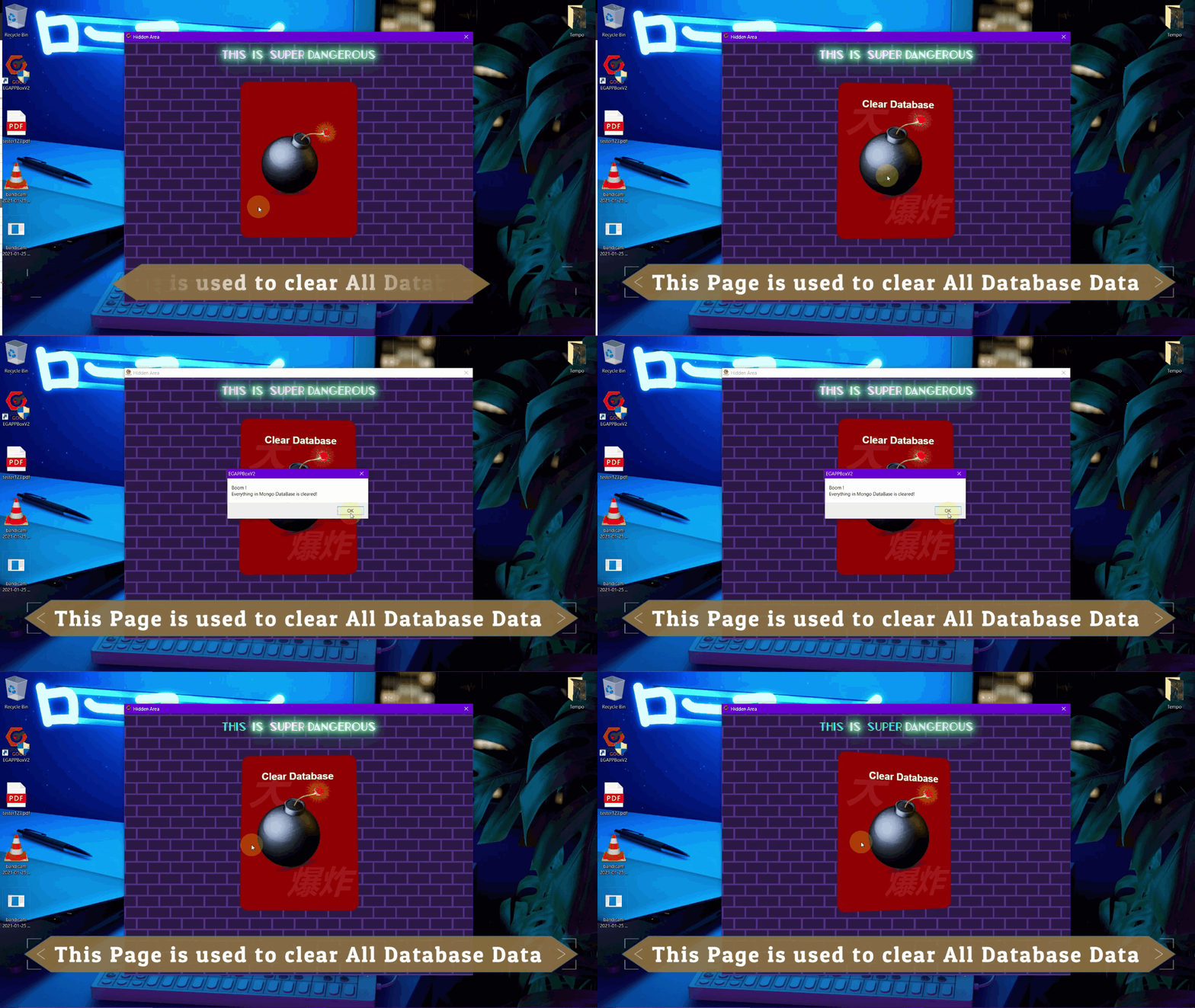
Clear the Database?
When to clear the database? Users have to remember to clear the database after a few days of using the App to ensure the space in MongoDB is always available and enough.
Users can also choose to clear the database everyday.
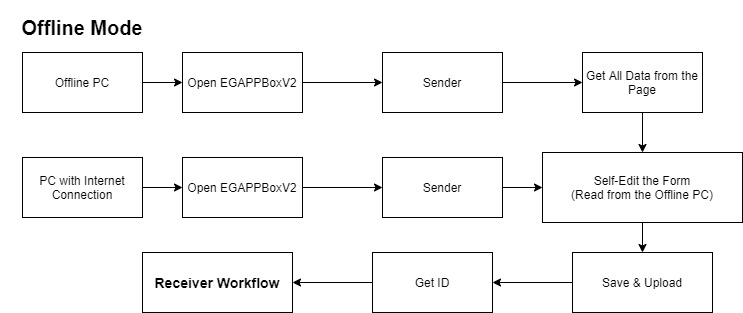
What to do when PC is offline? (Unable to connect to Internet)
EGAPPBoxV2 is similar with the previous one. It also runs on ElectronJS.
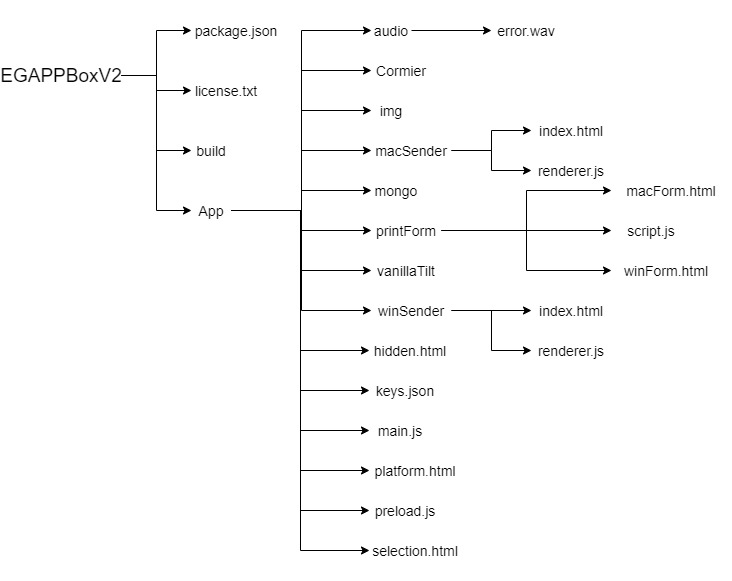
package.json is used to store the details of the Application and the lists of JavaScript packages which have been used in the App.
build is to store items needed when packing and building the App.
App includes all the UI and function scripts in the App.
audio stores audio file which used in the App.
Cormier stores the custom fonts files. (Cormier Font-Family has been used in the App)
img stores all images used in the App.
macSender includes Sender Form for the MacOS and its script.
mongo includes Mongoose API which used to connect MongoDB (Online Database) and perform integrations.
printForm includes CAC Form for both MacOS and Windows and their script.
vanillaTilt is used to beautify the Menu page buttons. (It gives 3D effects on the buttons)
winSender includes Sender Form for the Windows and its script.
hidden.html is the page which is used to clear MongoDB data.
keys.json is the Google Sheets API keys used in the App to append data.
main.js is the main process script which runs ElectronJS and start the App.
platform.html is the page which ask users to pick their Receiver Operating System (OS).
preload.js is called in main.js. The main process will run functions in preload.js before the App is started.
selection.html is the first page users will see when the App is started. It asks users to pick their role (Sender or Receiver) where Sender is used to edit and store current PC data and Receiver is used to append data receive from Sender to Google Sheets and create PDF for printing purpose.
Installation
EGAPPBoxV2 is able to run on both MacOS and Windows OS.
Besides, the installation process is easy and the app has portable version for both OS which doesn't require installation to run the App.
Run the App with Installation
Download the installation setup from the GitHub release. ("EGAPPBoxV2.Setup.2.0.0.exe" for Windows OS and "EGAPPBoxV2-2.0.0.dmg" for MacOS)
Run the setup once complete downloading.
Select installation path for the App.
Once the installation is done, there should be a shortcut for EGAPPBoxV2 in the Desktop.
The App is ready to run.
Run the App without Installation
Download EGAPPBox Portable version from the GitHub release. ("EGAPPBoxV2_Protable.exe" for Windows OS and "mac-portable.rar" for MacOS [Unpack the RAR] )
Once the App is downloaded, it is ready to use.
APIs
API is the acronym for Application Programming Interface, which is a software intermediary that allows two applications to talk to each other.
Each time you use an app like Facebook, send an instant message, or check the weather on your phone, you’re using an API.
EGAPPBox uses Google Sheets APIs to connect Engineering Good Google Sheets and Append data from PC to Google Sheets
Google Sheets API
As told from above section, the Google Sheets API is stored in keys.json.
And the format looks like:
Intergrations
"A cross between design and development"
Integrating means turning design images into a working website while being as faithful to the initial project as possible.
It means creating web pages fully compatible with all browsers for developers to use later on.
"Well, I don't really know how to explain or define INTEGRATION.
So, Just think that the following parts or sections are talking about the connection between services and EGAPPBoxV2." 👉 By: 9Guest
List of Integrations
In EGAPPBoxV2, there are 2 integrations used
MongoBD Integration
MongoDB is a convenient online database which used to store all the Windows or Mac PC data.
All the PC data is stored with specific IDs and can be retrieved from anywhere.
Discord Integration
Discord is an instant messaging and digital distribution platform designed for creating communities.
When the PDF contains CAC form is created, it will be sent to Engineering Discord Server Channel by the Discord Bot (EGAPPBox#1284).
MongoDB (Online Database)
In this section, I will be showing and explaining how to code for MongoDB integration.
Introduction
First, What is MongoDB?
“ MongoDB is a cross-platform document-oriented database program.
Classified as a NoSQL database program, MongoDB uses JSON-like documents with optional schemas. ”
MongoDB is a NoSQL database – a NoSQL database is one where you don’t query the database with SQL.
MongoDB is a JSON document datastore. It allows you to store and query JSON style documents with a few smarts on top.
This means that you can store objects with nested data all in one collection (collections are like tables for MongoDB).
It is generally faster than traditional SQL databases for transactional stores but lacks the query power for Analytical usage.
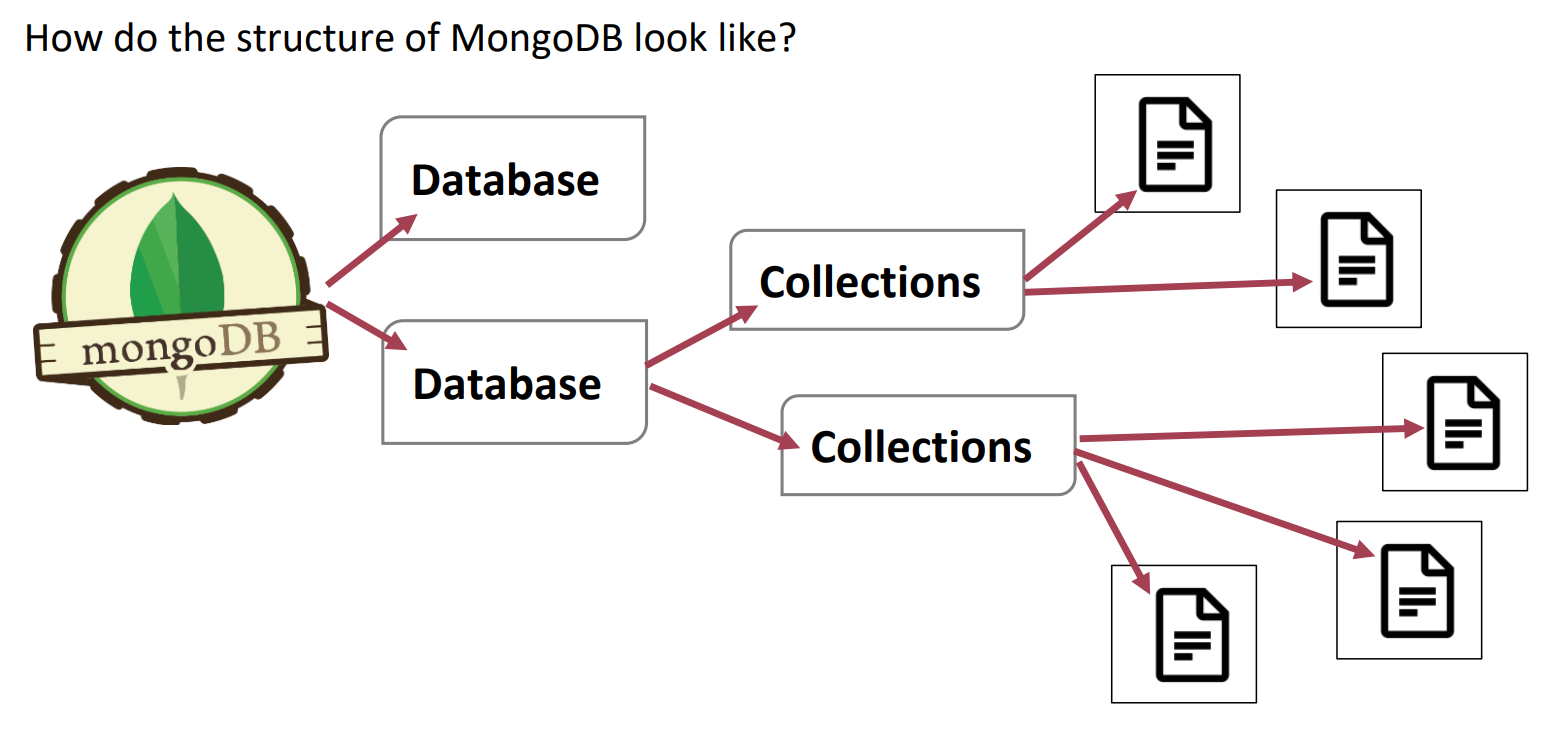
The Structure of MongoDB
The figure above has shown the structure of the MongoDB.
When a new MongoDB account is freshly created, users can follow the beginner guide to created a Database.
The Database will contains collections created by the users in future and documents will be stored inside each collection.
The Documents are similar to a page which contains info or data.
The Collections act like a book which contains pages (Documents).
The Databases act like bookshelves which store different books (Collections).
Let's Get Started
After understanding some basics of MongoDB, let's get to coding part.
In EGAPPBoxV2, JavaScript is used as main programming language and therefore MongooseJS Package have been installed and used.
To get to know how to use MongooseJS package, users can read the Documentation here.
To Install MongooseJS package,
Type npm install mongoose in the terminal to install the package.
Next, "mongo" directory is created to store all MongoDB related files.
Collection Schema
Collection Schema will be setup first as it will determine the format of the document will be stored in the collection.
In the EGAPPBoxV2, egUser.js is the file with contains Schema or Format for the collection
mongo/Schema/egUser.js
Document Functions
Documents in a collection can be updated, created, deleted, cleared with the functions declared here.
mongo/eguser.js
Connection Setup
To start a connection between the App and MongoDB, a file which contains the setup functions is created and ready to be called in the Main Process of the App.
[ The MongoDB URL key will be generated after creating a MongoDB Account and creating a database. ]
mongo/data.js
Start the Connection
Next, just start the connection to MongoDB in Main Process (main.js) and then everything is ready.
main.js
Extra for Developer
There is a way to check the MongoDB database visually and easily.
Besides, it also allows users to edit the Databases.
MongoDB Compass
The GUI for MongoDB.
Visually explore your data.
Run ad hoc queries in seconds.
Interact with your data with full CRUD functionality.
View and optimize your query performance.
Available on Linux, Mac, or Windows.
Compass empowers you to make smarter decisions about indexing, document validation, and more.
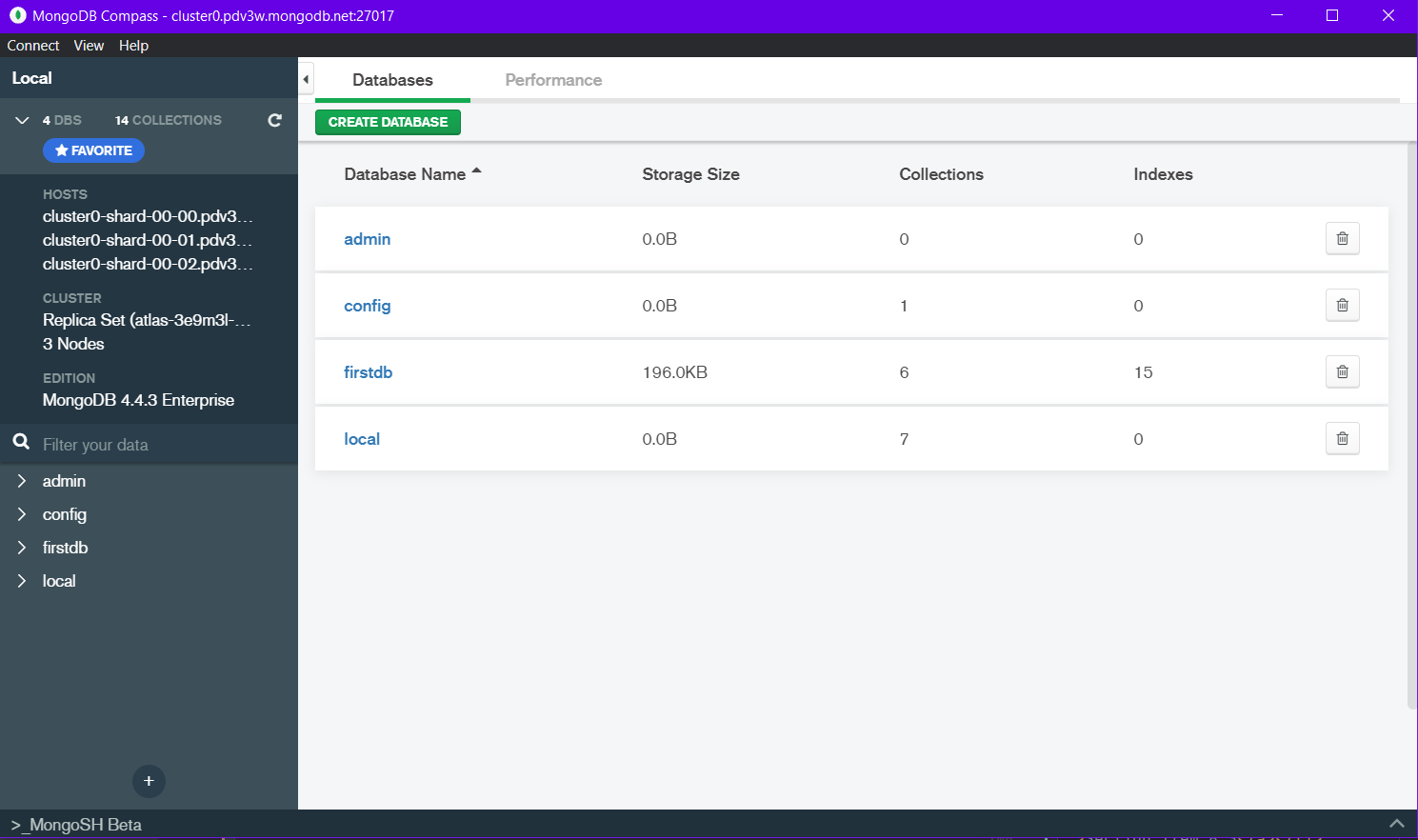
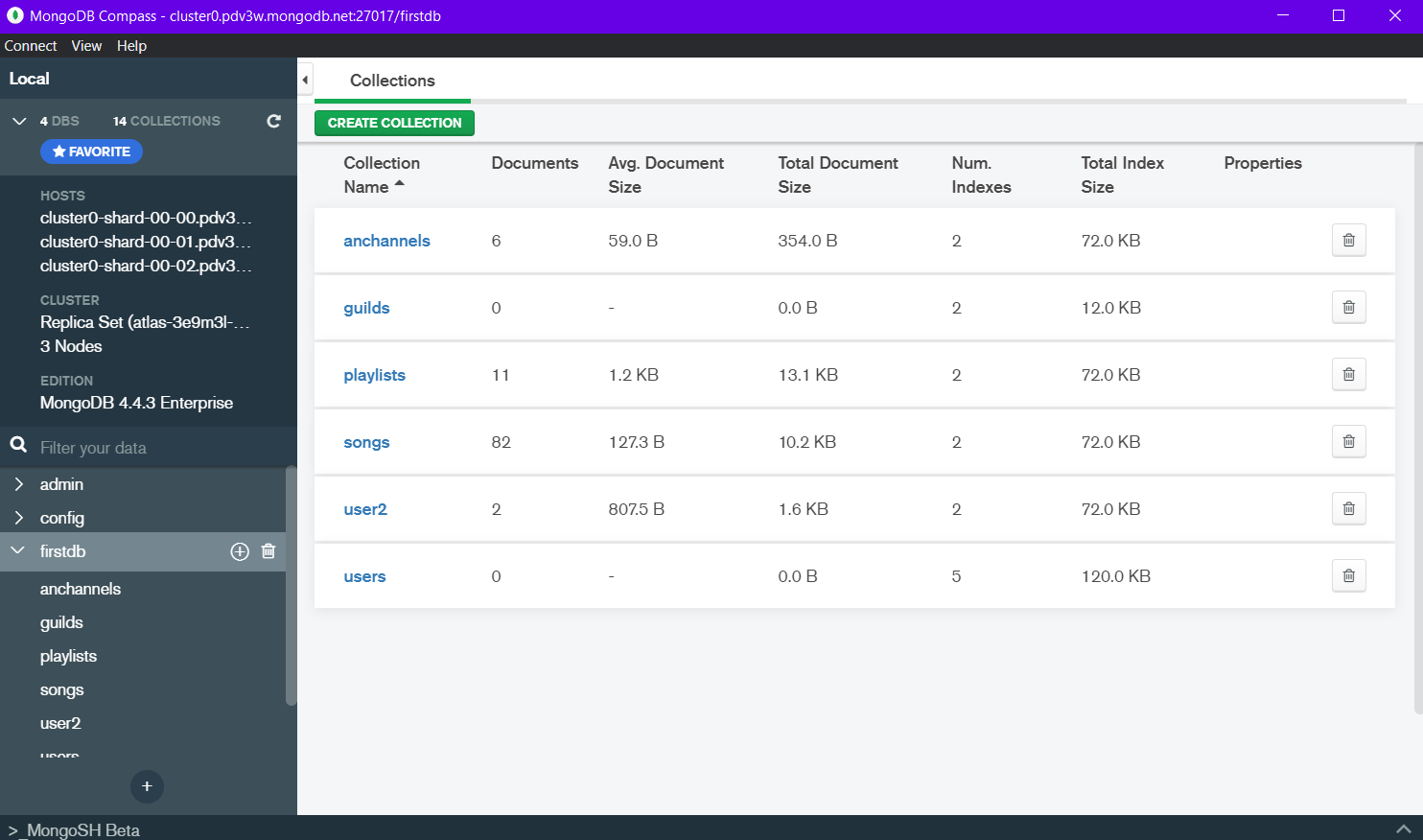
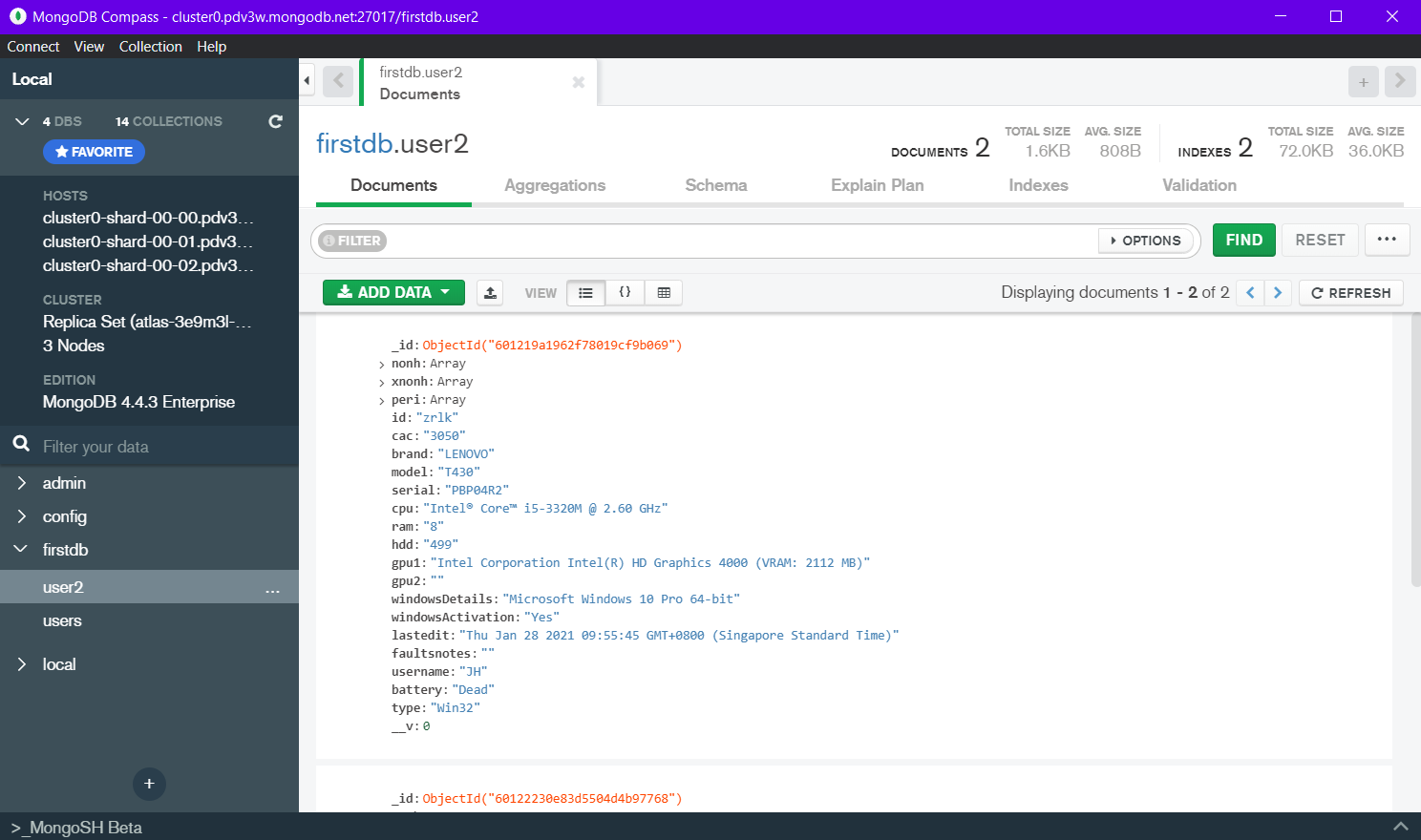
For EGAPPBoxV2 case, the data is stored in firstdb database > users(MAC PC Collection) & user2 (Windows PC Collection).
Discord
Discord is an American VoIP, instant messaging and digital distribution platform designed for creating communities.
Users communicate with voice calls, video calls, text messaging, media and files in private chats or as part of communities called "servers."
Discord Developer
"
You’ve found the Discord Developer Documentation! These pages are dedicated to showing you all the ways that you can use Discord to make cool stuff. Whether you’re looking to create awesome bots for your community, empower your applications with our API, or hook us right into your game with Rich Presence or the GameSDK, Discord has something for you.
"
- From Discord Developer Portal Introduction
Discord Bot, EGAPPBox Discord Bot (EGAPPBox#1284)
Bots and apps are the lifeblood of the Discord development community.
Therefore, EGAPPBox Discord Bot (EGAPPBox#1284) is created to send created PDF which contains PC info to Engineering Good Discord Server.
This allows users to access those PDF files created from Discord Channel and print them out from anywhere.
Let's Get Started
Due to the presence of EGAPPBox Discord Bot (EGAPPBox#1284), therefore there is no need to guide on how to create one.
The Discord Bot Client Key can be found from main.js.
To Connect and start Discord Bot, Client Key is needed to log into the Discord Bot.
Follow the below steps to Connect the Discord Bot and run actions
1. Install DiscordJS package
npm install discord.js
2. Declare DiscordJS package in Main Process (main.js)
const { Client } = require("discord.js");
3. Declare the Discord Token and Client which ready to be Connected
EGAPPBox Main Process
Talking about EGAPPBox Main Process, it is happening in main.js which contains everything on how the app works.
Therefore, I will separate main.js into multiple section to talk on the details.
Package Included
These are all the declared package and import files.
Start App Function and Declaration
Declaration
client is declared for Google Sheets Integration. win is declared to create a application window when app is started. discordClient is declared for Discord Bot integration. discordToken is declared for Discord Bot Login.
Start App Function
This Function will be called when the app is started. It will set the win (window) and connect to different services.
App On Event
Events which will be running when the App is started.
Functions Used in Main
Google Sheets Integration Function
ipcMain
ipcMain is used to communicate asynchronously from the main process to renderer processes.
The main process will be happening in main.js.
The renderer process will be happening to the pages which load up (HTML script).
The ipcMain module is an Event Emitter.
When used in the main process, it handles asynchronous and synchronous messages sent from a renderer process (web page).
Messages sent from a renderer will be emitted to this module. [ More... ]
Main Process to save data into a file
Main Process to read data from a file
Main Process to Check Availability of a file
Main Process to check thisPC ID and create one if undefined
Main Process to ask user for confirmation
Main Process to check Mongo for thisPC ID
Main Process to create data Doc in Mongo
Main Process to update data Doc in Mongo
Main Process to restart the App
Main Process to get data from Mongo
Main Process to print PDF
Main Process to send PDF to Discord
Main Process for GoogleSheets API
Main Process to clear all data in MongoDatabase
Bugs
A software bug is an error, flaw or fault in a computer program or system that causes it to produce an incorrect or unexpected result, or to behave in unintended ways....
A program that contains many bugs, and/or bugs that seriously interfere with its functionality, is said to be buggy (defective).
Bug 1: Create PDF
This bug is expected and acknowledged by the developer, 9Guest. Unfortunately, the developer is a super lazy & useless programmer.
Therefore, this bug will be last forever and never will be updated by 9Guest.
"Haha, I am too lazy to redo the thing already, let it be or just wait for the new developer who are willing to help me to change it."
👉 By: 9Guest
FAQs
Sorry, there is no FAQs here.
Contact Me?(FAQ Category One)
Where to find this stupid developer?
Sorry, the developer of this App will vanish once his internship ended in March 2021. If you really want to find him desperately, try the Discord Server
.
How to takeover the development of EGAPPBox from this useless developer?
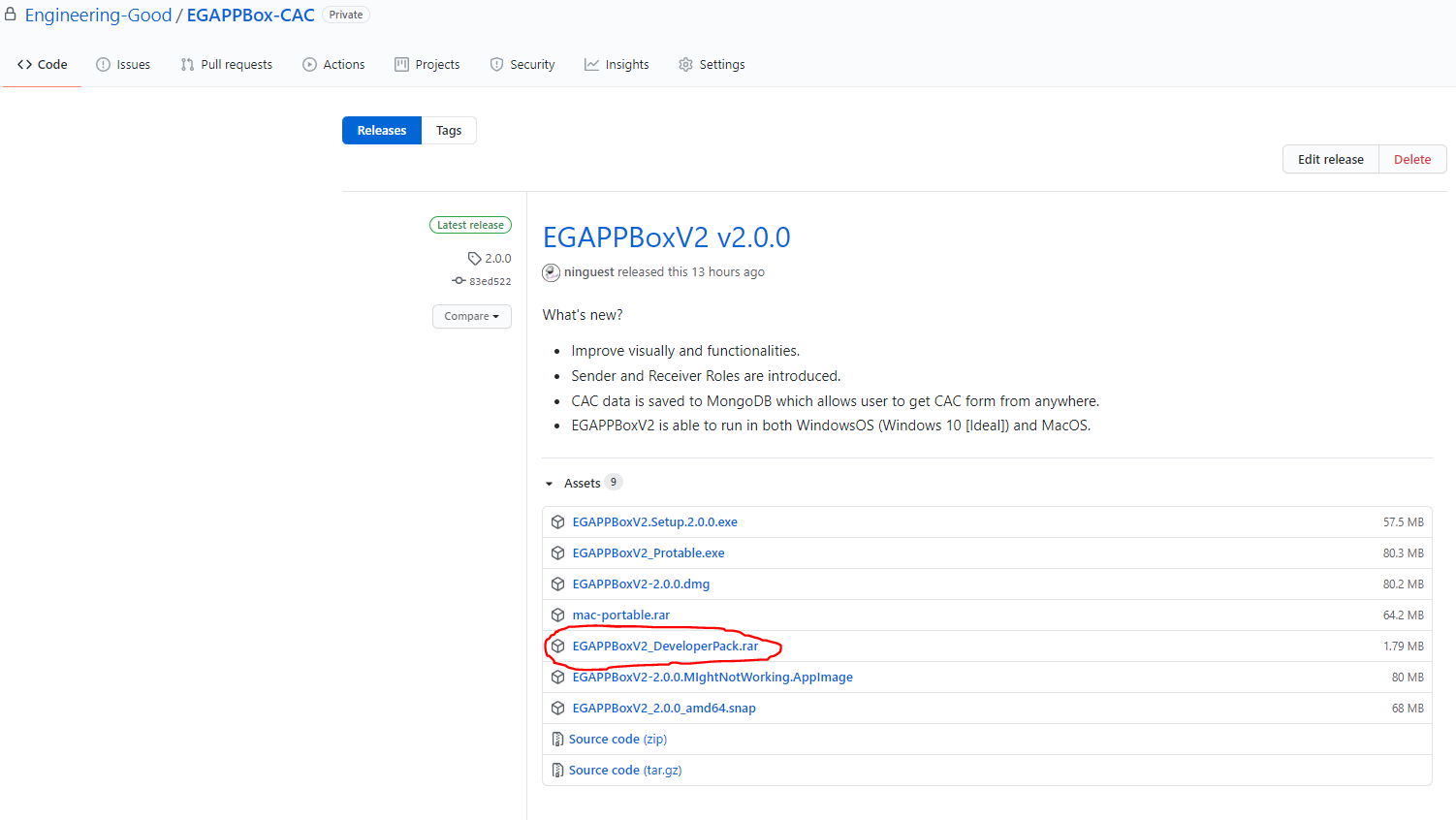
How do you get to Develop this App? After request permission to join Engineering Good @ GitHub, proceed to EGAPPBoxV2 Developer Release and download the EGAPPBoxV2_DeveloperPack.rar.
Then you may start editing and coding. After finishing your work please share your work to Engineering Good.
Thank You Very Much !!!!
Developer
Want to be EGAPPBox Developer?
As told from above, if you want to help develop EGAPPBox, you have to ......
Click to following link will redirect you to a page on EGAPPBox Developer Workflow 👇👇👇